
MLops & Federated Learning
Train machine learning models using federated learning across your device network, keeping data local to each device.
Overview
OASEES MLops utilities support:
- Data preparation and synthetic data generation
- Federated learning with PyTorch or TensorFlow
- Model deployment for inference
- IPFS-based model storage
View all MLops commands:
oasees-sdk mlops
Data Preparation
Prerequisites
Data must be:
- In NumPy format (
.npyfiles) - Split into features and labels (two separate files)
- Located on each device that will participate in training
Prepare Dataset
On each device with training data:
oasees-sdk mlops prepare-dataset samples.npy labels.npy
Order matters: First file must be samples/features, second file must be labels.
This command:
- Creates synthetic data with the same shape
- Uploads synthetic data to IPFS (for pipeline creation)
- Moves original data to a mount location (data never leaves the device)
- Registers the device as having training data
Example: Iris Dataset
Download sample federated learning data:
# download_sample_fl_data.py
# Available at: https://github.com/oasees/Oasees-Sample-app

# Run on each device
python download_sample_fl_data.py
This creates poc_fl_data/ containing:
iris_data.npy(features)iris_target.npy(labels)
Prepare the dataset:
cd poc_fl_data
oasees-sdk mlops prepare-dataset iris_data.npy iris_target.npy
Check Available Data
List devices with prepared data:
oasees-sdk mlops fl-data-nodes
Example output:
iris_data.npy,iris_target.npy,device1
iris_data.npy,iris_target.npy,device2
Creating Training Pipelines
Using Example Templates
OASEES provides example federated learning projects:
# PyTorch example
oasees-sdk mlops init-example-pytorch example1

# TensorFlow example
oasees-sdk mlops init-example-tensorflow example1
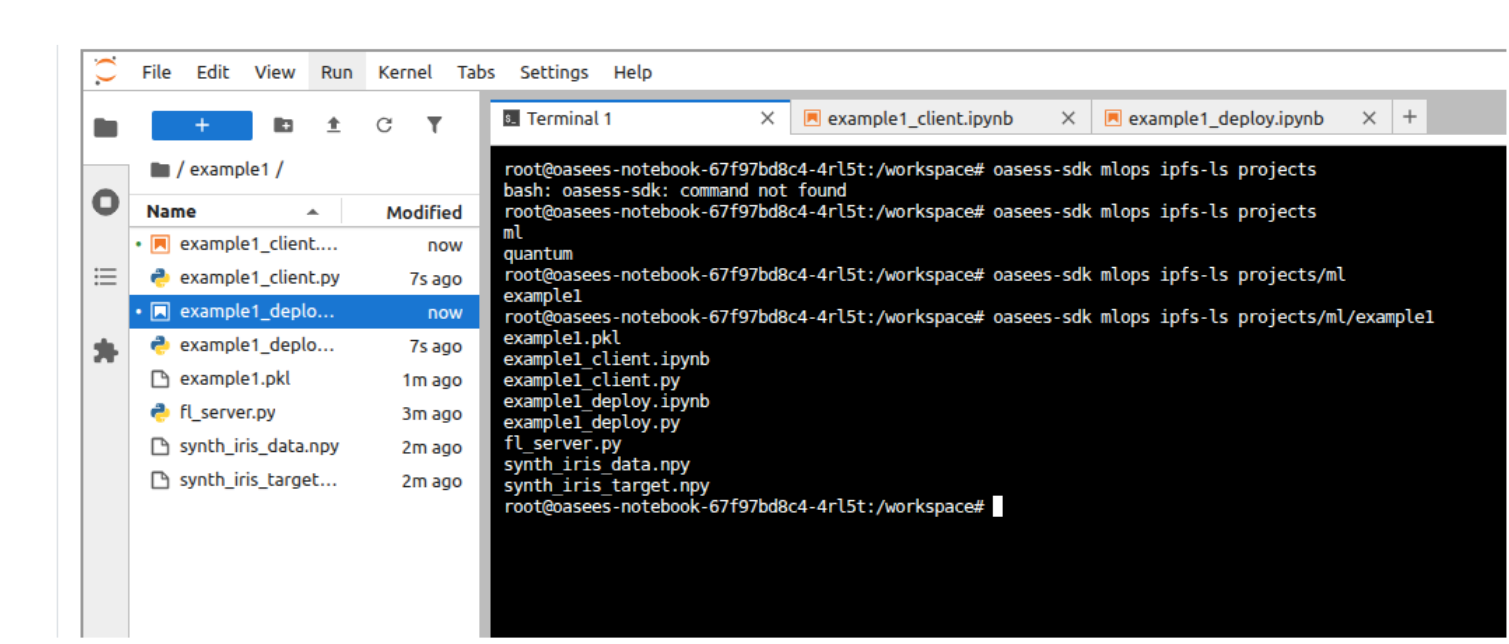
This creates a project folder with:
<project>_client.ipynb: Training pipeline notebook<project>_deploy.ipynb: Deployment pipeline notebook
Using Custom Templates
For custom models:
oasees-sdk mlops init-project my-custom-project
This creates templates you must populate with:
- Your model architecture
- Training logic
- Evaluation metrics
- Data preprocessing
Pipeline Development Workflow
- Open Notebook: Access Jupyter from the OASEES portal
- Edit Training Pipeline: Modify
<project>_client.ipynb - Test with Synthetic Data: Run notebook to validate logic
- Edit Deployment Pipeline: Modify
<project>_deploy.ipynb - Test Deployment: Run deployment notebook
- Verify in IPFS: Check pipelines are stored
The notebooks perform local validation with synthetic data before actual federated training.
Verify Pipeline Storage
oasees-sdk mlops ipfs-ls projects/ml/<project_name>
You should see:
<project_name>_client.py<project_name>_deploy.py- Synthetic data files
- Saved models (after training)
Starting Federated Learning
Basic Command
oasees-sdk mlops start-fl \
    --project-name example1 \
    --data-files "iris_data.npy,iris_target.npy,device1:iris_data.npy,iris_target.npy,device2"
Parameters
| Parameter | Description | Default |
|---|---|---|
--project-name | Name of the ML project | Required |
--data-files | Data locations (see format below) | Required |
--min-clients | Minimum clients for training | Number of data files |
--num-rounds | Federated learning rounds | 5 |
--epochs | Training epochs per client | 5 |
Data Files Format
Format: "features.npy,labels.npy,node:features.npy,labels.npy,node:..."
- Comma-separated: features, labels, node name
- Colon-separated: different devices
- Must be in double quotes
- Spaces not allowed
Example for 3 devices:
--data-files "data.npy,labels.npy,device1:data.npy,labels.npy,device2:data.npy,labels.npy,device3"
Use output from
oasees-sdk mlops fl-data-nodesto construct the--data-filesparameter.
Advanced Example
oasees-sdk mlops start-fl \
    --project-name example1 \
    --data-files "iris_data.npy,iris_target.npy,device1:iris_data.npy,iris_target.npy,device2" \
    --num-rounds 10 \
    --epochs 10
Monitor Training
Training progress will be displayed in the terminal. Components deployed:
- FL Server: Coordinates federated learning
- FL Clients: Run on each device with data
Check pods:
kubectl get pods | grep fl-
After Training Completes
List trained models:
oasees-sdk mlops ipfs-ls projects/ml/example1
Models are timestamped: example1_2025-07-24_06-16-15.pkl
Deploying Models for Inference
Deploy a Trained Model
oasees-sdk mlops deploy-model \
    --project-name example1 \
    --model example1_2025-07-24_06-16-15.pkl
This:
- Retrieves the model from IPFS
- Wraps it in a Flask application (from deployment pipeline)
- Deploys it to Kubernetes
- Exposes it via a service
Check Deployed Models
kubectl get pods,svc -l tag=model
Example output:
NAME                                READY   STATUS
pod/example1-model-xyz123           1/1     Running

NAME                     TYPE       PORT(S)
service/example1-model   NodePort   5000:31234/TCP
Send Data for Inference
Use the provided script:
# send_for_inference.py
import requests
import numpy as np

# Load your data
data = np.load('iris_data.npy')

# Send to model endpoint
response = requests.post(
    'http://<node-ip>:<port>/predict',
    json={'data': data.tolist()}
)

print(response.json())
Update <node-ip> and <port> based on kubectl output.
Delete Deployed Models
kubectl delete pod,svc -l tag=model --force
IPFS Utilities
Upload to IPFS
# Upload file
oasees-sdk mlops ipfs-add myfile.pkl

# Upload directory
oasees-sdk mlops ipfs-add mydir/ --recursive
Download from IPFS
oasees-sdk mlops ipfs-get <hash> output_path
List IPFS Contents
# List all projects
oasees-sdk mlops ipfs-ls projects/ml

# List specific project
oasees-sdk mlops ipfs-ls projects/ml/example1
Copy Files in IPFS
oasees-sdk mlops ipfs-cp source_path dest_path
Remove from IPFS
oasees-sdk mlops ipfs-rm path/to/file
Get IPFS Stats
oasees-sdk mlops ipfs-stat path/to/file
Troubleshooting
Training Fails to Start
- Verify all devices have prepared data
- Check
--data-filesformat is correct - Ensure enough device resources
- Review FL server logs
Client Connection Issues
- Verify Kubernetes networking
- Check firewall rules
- Ensure VPN is active on all devices
- Review client pod logs
Model Deployment Fails
- Check model file exists in IPFS
- Verify deployment pipeline is valid
- Ensure sufficient cluster resources
- Review deployment pod logs
Inference Errors
- Verify input data format matches training
- Check model service is running
- Ensure port is accessible
- Review Flask application logs
Example: Complete FL Workflow
# 1. Prepare data on devices
# (On device1)
oasees-sdk mlops prepare-dataset iris_data.npy iris_target.npy

# (On device2)
oasees-sdk mlops prepare-dataset iris_data.npy iris_target.npy

# 2. Create project (from notebook)
oasees-sdk mlops init-example-pytorch iris-classifier

# 3. Develop and test pipelines in Jupyter
# - Run iris-classifier_client.ipynb
# - Run iris-classifier_deploy.ipynb

# 4. Check data availability
oasees-sdk mlops fl-data-nodes

# 5. Start federated learning
oasees-sdk mlops start-fl \
    --project-name iris-classifier \
    --data-files "iris_data.npy,iris_target.npy,device1:iris_data.npy,iris_target.npy,device2" \
    --num-rounds 10 \
    --epochs 5

# 6. List trained models
oasees-sdk mlops ipfs-ls projects/ml/iris-classifier

# 7. Deploy model
oasees-sdk mlops deploy-model \
    --project-name iris-classifier \
    --model iris-classifier_2025-07-24_14-30-00.pkl

# 8. Check deployment
kubectl get pods,svc -l tag=model

# 9. Test inference
python send_for_inference.py

# 10. Cleanup when done
kubectl delete pod,svc -l tag=model --force
Related Videos
- 7.fl-prepare-dataset.mp4
- 8.create-train-deploy-pipelines.mp4
- 9.federated-learning.mp4
- 10.deploy-model.mp4
Additional Resources
This completes the OASEES Stack & SDK Guide. For questions or issues, refer to the OASEES documentation repository.